Soaring | Autonomous Heavy Lift Drones
Aircraft Mission
Planning & Flying App
This sleek, user-friendly app transforms complex heavy-lift drone missions into a seamless experience. Built on Q Ground Control, it enables mission planning with features like package drop scheduling, multiple payloads, and custom mission types.
With full autonomy and advanced customization, this app brings powerful control to drone operations without the need for manual intervention. Explore how its thoughtful design elevates drone mission planning to new heights.
Year
2025
Scope of work
Product design
User experience
User research
Duration
12 weeks


Let's start with the basics
Soaring Technologies used Q Ground Control for mission planning—a capable but outdated and unintuitive tool. With the drone now reaching users, I set out to make the interface friendlier. After analyzing our engineering team’s customizations and studying mission planning workflows, I gathered user insights to design practical, user-centered solutions.


Straightforward Homescreen
The homescreen is designed for simplicity, providing clear insights into your drone’s health and easy-to-navigate menu options. Whether you’re planning a mission or adding a payload, the intuitive layout guides you seamlessly to the tools you need.


Mission Planning in Four Easy Steps
The app lets you effortlessly create missions with flexible options: freehand a route as it auto-generates waypoints, set up a grid for area surveillance, or manually place each waypoint. Best of all, frequently flown missions can be saved as presets for quick reuse, saving time and effort. Missions can also be pinned to specific coordinates—or left flexible for easy adjustments.
Attaching a Payload
To add a payload, users simply select its type—whether fixed, slung, netted, loose or dispensing—prompting the aircraft to adjust flight settings for safe transport. Users can then upload a photo and input details like weight, which are sent directly to the aircraft. Payloads can be attached immediately, saved for frequent reuse, or both, making setup quick and flexible.

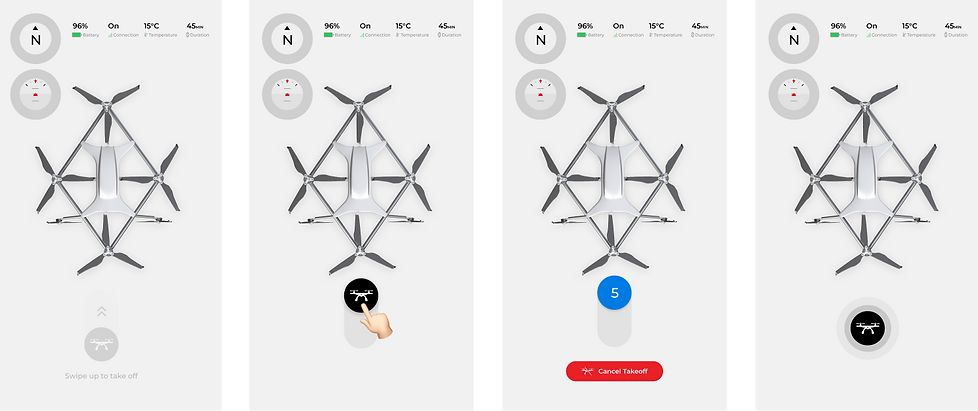
Take Off Interaction


Light Mode